
Unique ADAM accounts with logins are only needed for administrative users including District Test Coordinators and School Test Coordinators.
Students will be added to ADAM for you based on the TSDL Files provided to the state.
Role Setup
Your ability to create other administrative user accounts is tied to the role you are assigned.
- District Test Coordinators – can create users having the roles of School Test Coordinator
- Log into ADAM www.adamexam.com
- Navigate to the Rostering menu, then click Users.
- Click the Create New button in the top right of the page.
- Fill out
- Given Name with the user's First Name
- Family Name with the user's Last Name
- Role with the appropriate role (STC)
- Identifier with the email address of the user
- Org Scope with the school(s) this user has responsibility
- Sourced ID with the email address of the user
- Username with the email address of the user
- User Email with the email address of the user
- User Enabled the checkbox defaults to 'checked' for new users.
- Send Welcome Email the checkbox is off by default, please 'check' this box when creating new users.
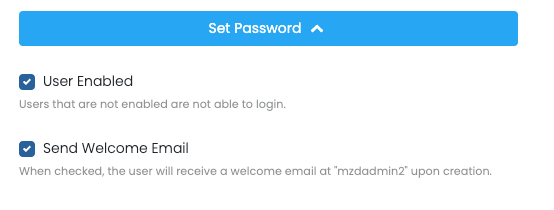
- Press the Submit button to Save.
Do not use the Set Password feature. If used, the user WILL NOT get the Welcome Email.
Comments
0 comments
Please sign in to leave a comment.