
Are you Authorized to modify user records?
You may not have authority to update user records in ADAM. If there isn't an 'update' button at the bottom of the screen or if the fields are all locked, then you don't have permission to edit.
I get an error message when I try saving
However, if you do have authority to edit and If you receive an error message when trying to save changes on a user record in ADAM, it could be a result of your browser trying to be helpful. This article explains what might be happening and what you can do to get the record to save.
Your browser typically has a feature used to populate web fields with your commonly used information. You will see this when filling out a form online, and your browser auto populates your name and address information.
In this case, your browser is getting confused on the user page when the email address is empty...more than likely, your browser is populating that field with your email address. ADAM does not allow two users to have the same email address, so it gives you a 'duplicate' error instead of saving the record.
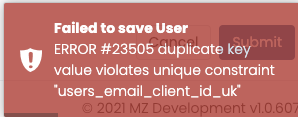
Failed to save User
ERROR #2305 duplicate key value violates unique constraint "users_email_client_id_uk"
When updating a user record (that isn't yours) make sure that your email address isn't being set in the 'user email' field. Student records should have a blank email address. After you remove the email address from the User Email field...try saving again.
Comments
0 comments
Please sign in to leave a comment.